Change your calorie and macro targets
Where your daily numbers come from, how to set them yourself, and why they sometimes stop moving.
Updated
Your targets are already set. The Gymbers app works them out from your weight, height, age, sex and activity level, then adjusts for your fitness goal.
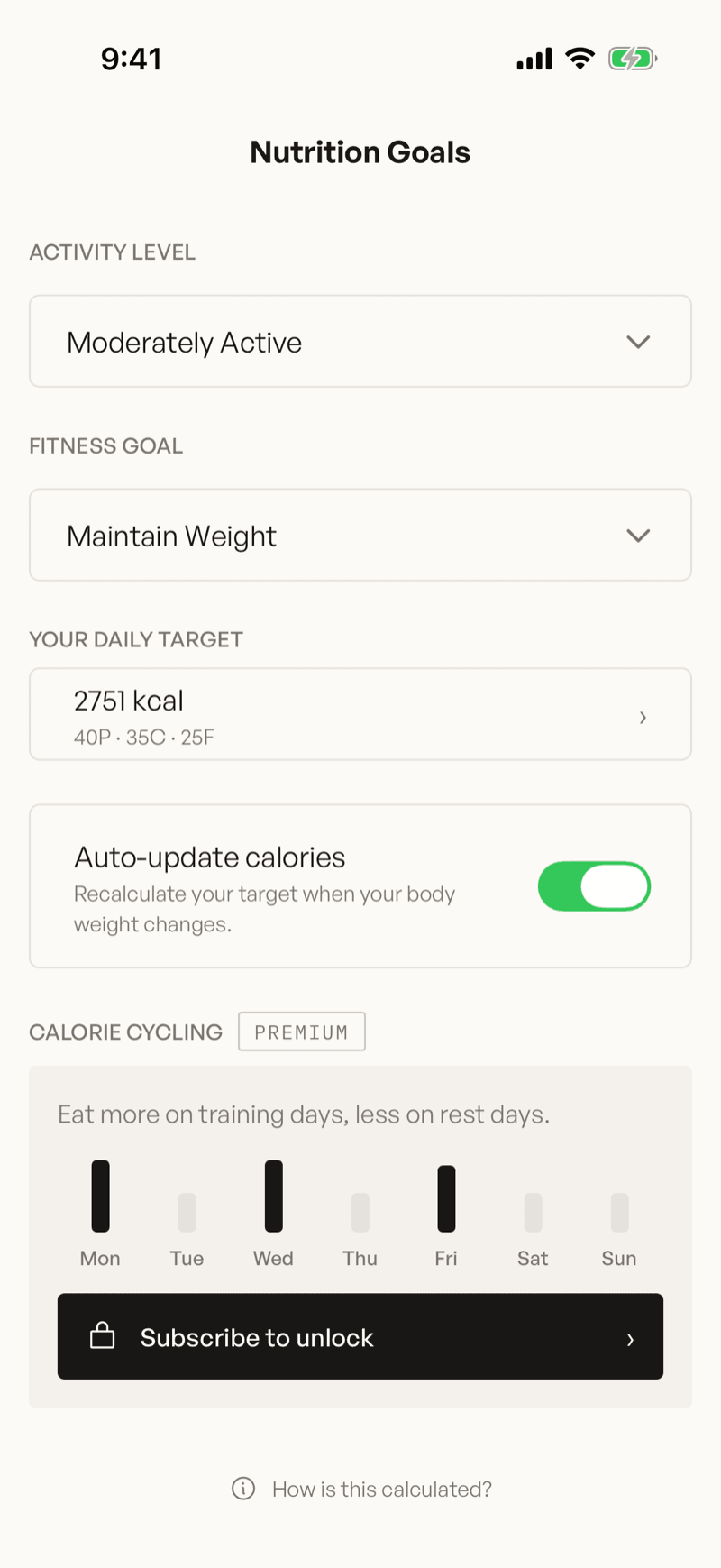
To change them, open Settings (the gear at the top of your profile) and tap Nutrition Goals.
There are two levels, and that trips people up
Nutrition Goals holds the inputs — your activity level and your fitness goal — and shows the result as a single row under Your Daily Target.
The numbers themselves aren't on that screen. Tap the target row to open the editor, where the calorie and macro fields live.
Let the app do the maths
Change the inputs and the numbers follow.
Set your Activity Level
Sedentary through Extra Active. This multiplies your baseline burn, so count how you actually spend the week, not how you'd like to.
Set your Fitness Goal
Nine options, from Extreme Weight Loss to Fast Weight Gain. Each one shows its weekly rate and the daily deficit or surplus behind it.
Check the result
Your calories are recalculated straight away. If you'd typed your own calorie number, the app asks before replacing it.
Changing either input also resets a custom macro split to Balanced, without asking. A named preset stays as it is.
Tap How is this calculated? at the bottom of the screen to read the formulas and the research behind them.
Or set the numbers yourself
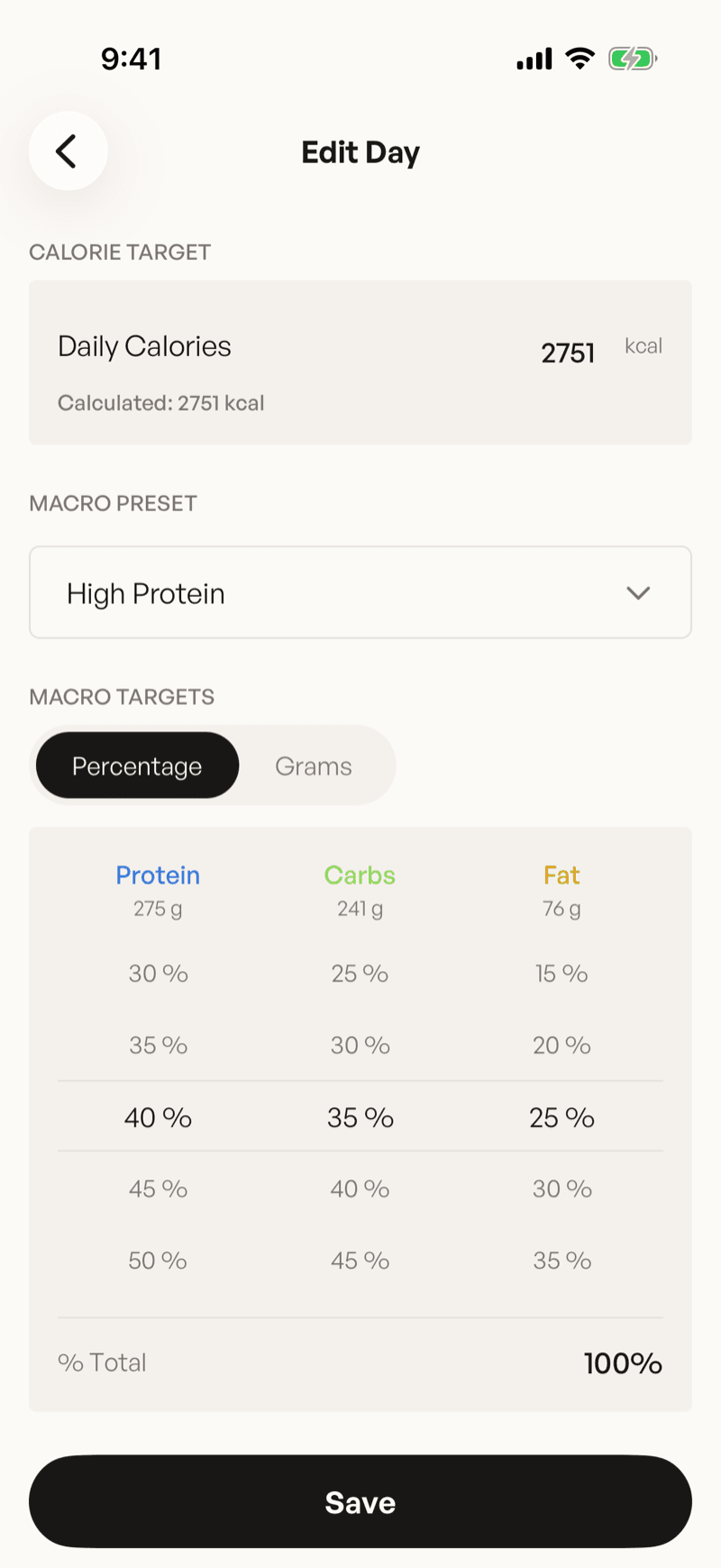
Tap the Your Daily Target row. The editor opens — it's titled Edit Day, which is the same screen you get when editing a single day of a cycling schedule.
- Daily Calories — type any number. The line underneath shows what the app calculated, so you can always see what you're departing from. Once you've changed it, Reset to calculated puts it back.
- Macro Preset — pick a named split, or adjust the wheels below to go custom.
- Macro Targets — switch between Percentage and Grams. The wheels move in 5% steps and the running % Total has to land on 100.
Tap Save. Nothing is applied until you do.
Macro presets
| Preset | Protein | Carbs | Fat |
|---|---|---|---|
| Balanced | 30% | 40% | 30% |
| Low Carb | 40% | 20% | 40% |
| High Carb | 25% | 55% | 20% |
| High Protein | 40% | 35% | 25% |
| Ketogenic | 25% | 5% | 70% |
A custom split survives a calorie change. The app keeps your ratio and recalculates the grams, so 40% protein is still 40% protein at the new target.
Why your calories might be higher than your goal implies
The app won't take you below 1,500 kcal a day — 1,200 if you're female or haven't set a gender — whatever goal you pick. When a goal would go under that, the target stops at the floor and a line under Fitness Goal shows the rate you'll actually lose at, which is slower than the goal advertises.
When targets stop updating on their own
Auto-update calories recalculates your target whenever you log a new bodyweight. Three separate things switch it off:
- You turned the toggle off.
- You typed your own calorie number. This turns the toggle off for you.
- You turned on Calorie Cycling (Premium). Per-day targets replace the single number, so there's nothing to auto-update.
Any one of them is enough, and you're reading this weeks later wondering why your target hasn't moved. Open Nutrition Goals and check the toggle before assuming something's broken.
If there are no calculated numbers
The app needs your weight, height and birthday to calculate anything. If any of them is missing, a notice at the top of Nutrition Goals says so, there's no calculated target, and auto-updates can't run. You can still type your own numbers and use the app normally.
Filling in your profile is the fix:
- Birthday — Settings → Profile, under Date of Birth.
- Height — on your profile, tap Body, then Height.
- Weight — tap + in the tab bar, then Add bodyweight.
Still not right?
If your numbers look wrong and none of the above explains it, set your Activity Level and Fitness Goal again. That recalculates your calories from scratch, so you're back on the app's figures and can change one thing at a time from there.
Was this helpful?
Read next
Still stuck?
Tell us what happened and we'll take a look. Include your account email and roughly when it went wrong — it makes this much faster.